> For the complete documentation index, see [llms.txt](https://fe-qasir.gitbook.io/qiblat-documentation/llms.txt). Markdown versions of documentation pages are available by appending `.md` to page URLs; this page is available as [Markdown](https://fe-qasir.gitbook.io/qiblat-documentation/features/components/common.md).
# Common
The place to create local components that are common in the app project.
## How to use
If you are going to create a global component that applies only to the project then you can use this method.
### Step 1: Set up component
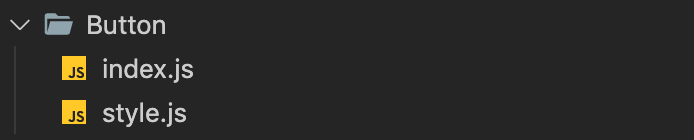
The first step you have to create a component folder in `./src/components/common`. With the file structure as below.
### Step 2: Component code
**index.js** used to place the root function component in which there are props and rendering elements. Here we use override button component with [Qasir UI](https://qasir-ui.qasir.xyz/) or [Material UI](https://v4.mui.com/). You can also **create pure components** that you want without overriding other component design systems.
```jsx
// Vendors
import React from 'react';
// Qasir UI
import Button from 'qasir-ui/inputs/Button';
// Styles
import ButtonStyled from './style';
const Button = () => {
const classes = ButtonStyled();
return ;
};
export default Button;
```
### Step 3: Component style
**style.js** used to style the component. Here we use one of the function styles from [Material UI](https://material-ui.com/), namely `makeStyles`.
```jsx
import { makeStyles } from '@material-ui/core/styles';
const ButtonStyled = makeStyles(() => ({
root: {
backgroundColor: 'blue',
width: '100%',
borderRadius: 10,
},
}));
export default ButtonStyled;
```
### Step 4: Import component
We use aliases for component usage, code as shown below. You can check aliases configs in `jsconfig.json`
```jsx
import Button from '@/common/Button';
```